WhatsApp • Concept • 2026
Bringing reminders to WhatsApp

Role
Product Designer
Timeline
1 week
Skills
Product design
UX research
UI design
View mockups
Overview
Designing for the reply you meant to send on WhatsApp
WhatsApp is where billions of conversations happen, and plenty of them end with "I'll reply later."

User gets a text thinks “I’ll reply later”

Later never comes. New chats bury the old one.
Problem
There is an intention there to reply, but no system to act on it.
The problem isn't people forget to reply, it's that WhatsApp has no way to help users act on their intention.
75%
6 of 8 said they forget to reply frequently, multiple times a week.
87%
7 of 8 rely on memory, with no other system in place
Small sample, skewed toward people close to me, so this is directional, not conclusive. But it pointed at something specific: people need help following through, not remembering.
I do this myself; I open a message, decide I'll reply later, and then forget. To check if this was just a me-problem, I ran a short survey with 8 friends and family.
Why "Mark as Unread" doesn't fix it.
3 of 8 use it. Only 2 call it effective. New messages bury the unread chat before they act on it. Marking it as "unread" is passive; it only shows a green dot with the number of unread texts. It shows intent but does nothing to act on it.
Opportunity
How might we help people follow through on "I'll reply later" without relying on memory or hoping they notice the chat again?
Solution
Reminder that helps users act on their intention
A reminder scheduled directly from a chat. When it triggers, WhatsApp notifies the user and moves the conversation back to the top of the inbox.

Lock screen notifies users with the contact name and reminder label.

Chat resurfaces to the top of the inbox when reminder is triggered with a ringing clock icon to mark the reminder chat.
Design process
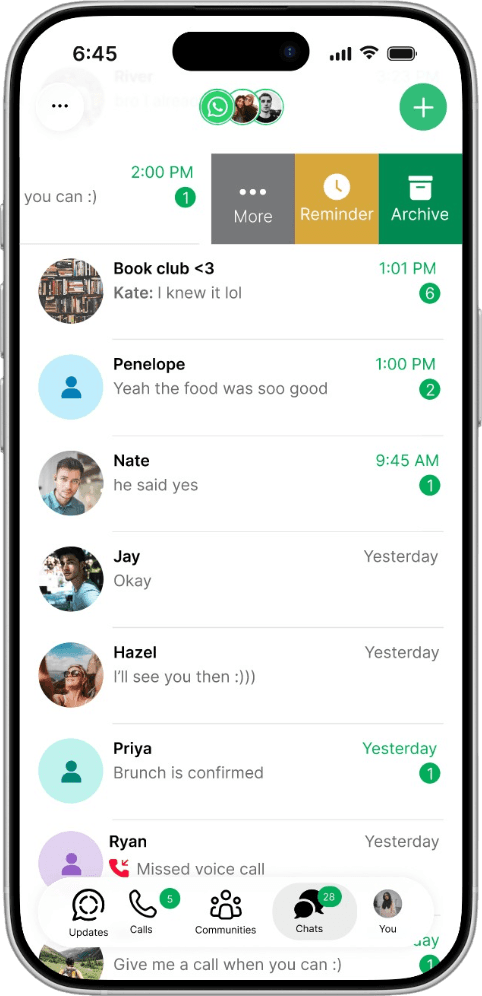
Swipe, not long-press
WhatsApp already has two ways to act on a chat: long-press opens a full menu; swipe reveals quick actions without opening the chat. Long-press felt obvious, it's familiar. But it can open the conversation by accident, and a user postponing a reply may not want it marked as read. Swipe solves this problem.
Reminder sits next to Archive and More. It's also available in the long-press menu as a secondary path.
Setting the reminder should take less time than texting back.
I didn't want this to feel like leaving the chat list to do a separate task, so I used a modal bottom sheet instead of a full-screen flow. Rather than invent a new visual style (which I did in the medium fidelity), I followed WhatsApp's own goal of feeling native to the device it's on, and leaned on iOS's actual system components to keep the experience completely familiar.
For Custom, I used the exact date and time picker iOS uses everywhere else: the scrolling wheel for picking hours and minutes. People already know how to use Apple's system components, so there's no learning curve, which makes setting a reminder even faster.


Why I didn't auto-cancel on reply.
My first idea: cancel the reminder if the user replies first. Why remind someone who already responded? But picture someone setting a 7 AM reminder to wish a friend happy birthday (beyond just replying, this feature lets you set reminders for any future event, like sending a document or asking to book the tickets), while still chatting with that same friend about something else the night before. Auto-cancel would delete the birthday reminder. So a reminder clears only when the user cancels it or it fires.
Once set, the chat row shows a small clock icon next to the note, so an active reminder is visible at a glance in the inbox. Tapping the reminder button again reopens the same sheet, pre-filled, with a red "Cancel reminder" button at the bottom.

What if the reminder gets missed?
What if the user misses their reminder notification or accidentally swipes it away?
A banner sits inside the chat after the reminder triggers: "Reminder sent Sept 2, 2026 at 11:00 AM. Note: Ask to call tomorrow at 3:00 PM." or "Send a message" if no note was attached. It stays until dismissed.

Reflection
Small annoyances are worth investigating
This started as something too minor to call a problem. Looking closer showed that everyday frustrations can reveal meaningful opportunities for better experiences.
Familiar isn’t always the way to go
Long-press felt like the obvious choice, it's what people already know. But it could accidentally open the chat, revealing to the other person that I'd already seen their message. Swipe solved this without that risk even through it is not as familiar.